Chair Buying Guide: Custom Your Seating Options


A well-designed chair can turn daily sitting into a more comfortable and productive experience. It helps reduce common problems such as lower-back pressure, shoulder tension, poor posture, and fatigue from long hours of sitting. With the right support, adjustment, and materials, a chair can make work, gaming, studying, or relaxing feel easier and more comfortable throughout the day.
This guide explains key chair categories, including office chairs, gaming chairs, wobble stools, and ergonomic kneeling chairs, along with the main features and maintenance tips worth knowing before making a choice.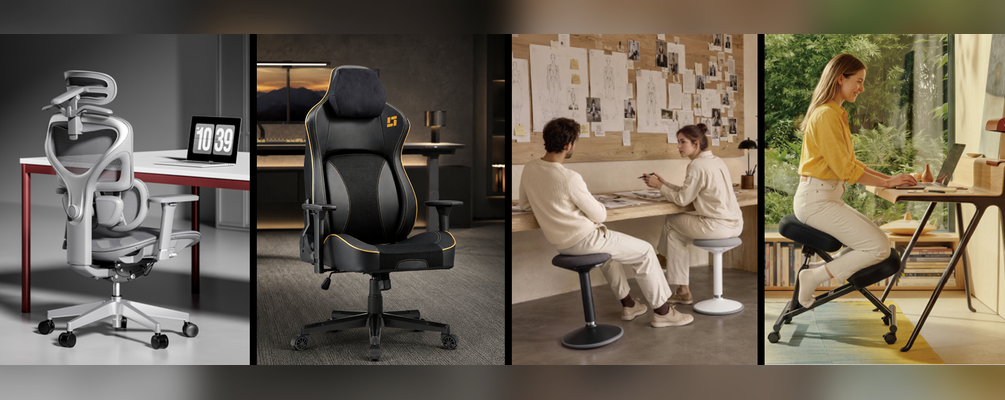
Key chair features usually come down to support, adjustability, materials, base stability, mobility, and available options. For projects that require more flexibility, customizable choices such as colors, upholstery materials, armrest types, bases, casters, and mechanisms make it easier to match different workspaces, user needs, and price levels. Explore the LUMIchair collection to learn more about customizable seating options.
Office Chairs and Gaming Chairs: Shared Core, Different Experience
They are both used for long hours at a desk, so comfort, adjustment, and stability are the key starting points.
Recline Control
A reliable recline function allows the body to shift posture during work, gaming, streaming, or short breaks. The mechanism should feel stable, smooth, and easy to control.
Height Adjustment
A smooth gas lift helps match different desk heights and sitting preferences. A Class 3 or Class 4 gas lift can offer better stability, smoother movement, and stronger weight support.
Armrest Adjustment
Armrests help support the shoulders, elbows, and forearms during long sessions. Basic height-adjustable armrests move up and down, while 2D, 3D, 4D, or higher-level armrests may also slide forward and backward, shift left and right, or rotate inward or outward. This flexibility helps create a more natural arm position for typing, mouse control, controller use, or relaxed sitting.
Base and Mobility
Supportive cushioning helps maintain comfort over time, while a strong five-star base improves balance during sitting and reclining. Smooth 360° swivel casters also make movement easier around the workspace.
(👇Explore LUMIchair's OCH01-6)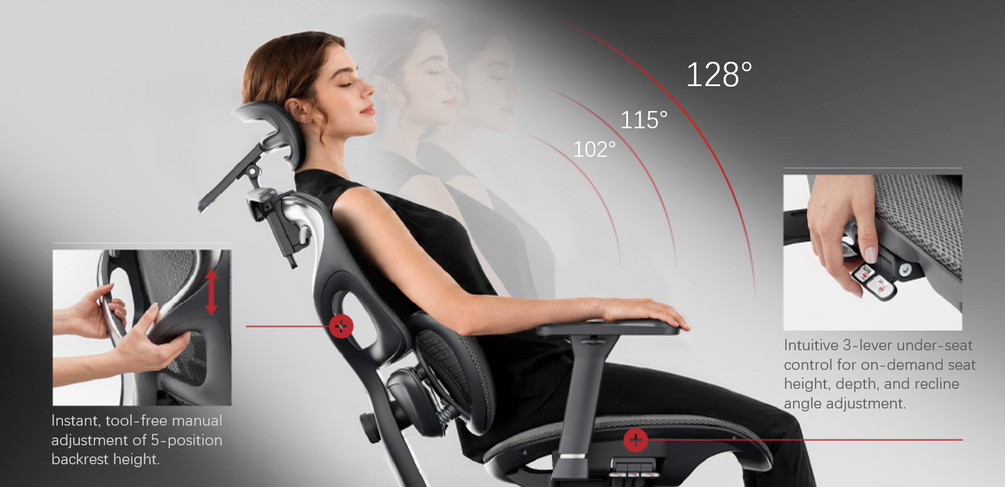
The main differences come from design and materials. Office chairs usually have a cleaner, more professional look, with mesh, fabric, or padded finishes for corporate offices and shared workspaces. Gaming chairs are more expressive, often using racing-style backrests, side wings, bold colors, contrast stitching, PU leather, fabric, or hybrid materials for a sportier setup. Some gaming chairs also feature RGB light strips or LED accents to create a stronger gaming atmosphere.
Linkage armrests are a more gaming-specific comfort feature. Connected to both the backrest and the seat, they recline in sync with the chair back without extra manual adjustment. This keeps the arms supported from upright play to deep recline, making posture transitions smoother and helping reduce shoulder and elbow fatigue during long sessions.
(👇Explore LUMIchair's CH09-29)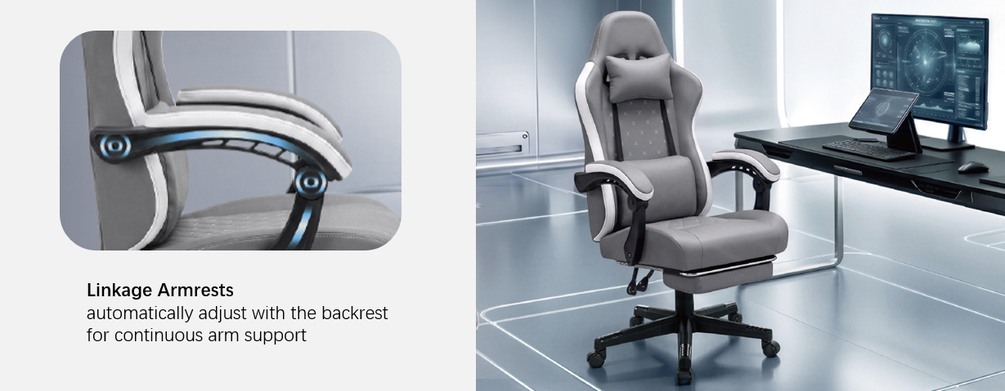
Wobble Stools and Kneeling Chairs: Lifestyle Seating
They are both designed to add more posture variety to daily sitting. Instead of keeping the body in one fixed position for long hours, they encourage small changes in posture, which can help reduce stiffness, improve comfort, and support better focus during work, study, or creative tasks. They work best as flexible seating options alongside standard office chairs.
A wobble stool focuses on dynamic sitting. Its rounded or weighted base allows gentle tilting, rotating, and posture shifting while seated, adding subtle movement to daily routines. Compact and easy to move, it fits well in home offices, studios, reading corners, and flexible work areas where a traditional chair may feel too fixed.
An ergonomic kneeling chair works more as a posture reset. Its angled kneeling seat tilts the pelvis slightly forward, helping open the hip angle and encourage a more upright spine. The padded knee support does not carry all the body weight; instead, it helps share part of the pressure from the hips and lower back. This type of knee seat chair is better suited for short sessions, usually around 30 to 60 minutes, rather than all-day sitting.
Cleaning and Maintenance Tips
Maintenance is a practical concern for any commercial chair purchase. Clear care guidance helps extend product life and reduce after-sales issues.
Mesh chairs should be vacuumed regularly to remove dust. Stains can be cleaned with mild soap and a soft cloth. Fabric chairs need frequent dust removal and spot cleaning with a fabric-safe cleaner. Excessive water should be avoided.
PU leather and leather-like materials are easier to maintain. A damp cloth is usually enough for daily cleaning, but alcohol-based cleaners, strong solvents, and direct sunlight should be avoided to reduce cracking or peeling.
Mechanical parts also need attention. Screws, armrests, casters, gas lifts, and reclining mechanisms should be checked regularly, especially in high-use workspaces or commercial furniture environments. Casters should be kept free of hair and debris to maintain smooth movement.
Conclusion
The right chair depends on how and where it will be used. An ergonomic chair supports long hours of focused work, a gaming armchair adds comfort and visual impact to screen-based setups, and a wobble stool or ergonomic kneeling chair brings more movement and posture variety to flexible spaces. By comparing support, stability, adjustability, materials, and maintenance needs, it becomes easier to choose furniture that fits the workspace and delivers long-term value.